



|
Name |
DuckDuckGo |
|---|---|
|
Google Play Link |
GET IT ON
Google Play
|
|
Category |
Productivity |
|
Developer |
DuckDuckGo |
| Last version | 5.295.3 |
|
Updated |
|
|
Compatible with |
Android 8.0+ |
Introduction to DuckDuckGo
Let’s talk about DuckDuckGo — a privacy-first browser app that skips all the tracking nonsense. Built for Android and available on multiple platforms, this mobile browser isn’t playing by the same rules as your average internet app. It throws out the playbook on data collection and flips the script by doing one thing really well: keeping your info safe and out of corporate hands. So if you’re the kind of person who’s tired of being watched online or just wants a smooth browser without strings attached, this one’s got your name on it.
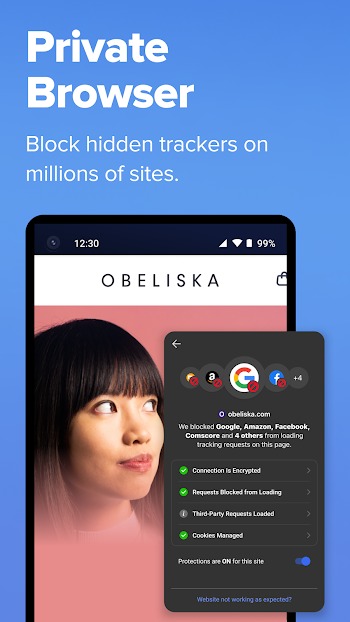
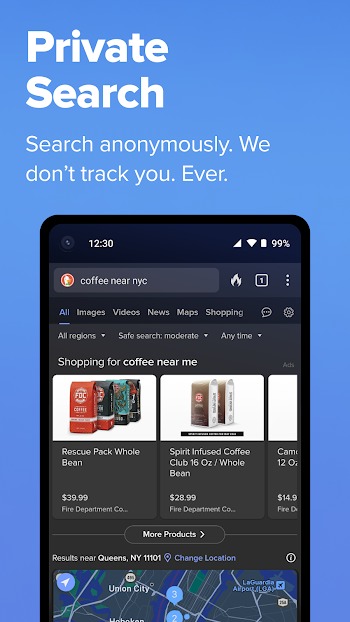
DuckDuckGo isn’t here to be flashy — it’s here to be solid. It’s got its own built-in search engine that doesn’t track your queries, so whatever you’re searching for, stays your business. Plus, it’s loaded with protective features most browsers don’t offer unless you jump through hoops. Think tracker blocking, forced HTTPS connections, email privacy tools, and even something called App Tracking Protection — which runs locally on your phone, blocking sneaky trackers from other apps too.
One standout feature that deserves a shoutout? The Fire Button. This little tool instantly wipes your open tabs, history, and all traces of what you were doing. It's kinda like having a digital escape hatch — one tap and it’s like you never opened the browser. You can even customize how it works, down to the wipe animation, because of course they thought of that.
Another win? Watching YouTube videos with zero targeted ads. DuckDuckGo uses something called Duck Player to give you distraction-free viewing with YouTube’s strictest privacy settings. That means no weirdly specific recommendations based on something you searched last week. Just clean content, minus the weirdness.
If you’re someone who bounces between desktop and mobile, syncing stuff like bookmarks and passwords is easy and encrypted. The app doesn’t ask for your email or a login either — syncing is done with a QR code and your data stays on your device. Translation: no one else gets access to your info unless they physically grab your phone.
And let’s not skip over the password manager. It doesn’t just remember your logins — it keeps them local, locked down, and lets you add notes too. No more sending your credentials through the cloud or praying they weren’t leaked. DuckDuckGo has taken the low-key approach to browser design: cut the fluff, keep what matters, and lock it all up tight.
At the end of the day, DuckDuckGo isn’t trying to be everything. It’s focused. It protects you in ways other browsers barely try to. You won’t see flashy interfaces or unnecessary bloat — just clean browsing, no tracking, and peace of mind baked into every feature.
FAQs DuckDuckGo
What is DuckDuckGo?
+
DuckDuckGo is a privacy-focused mobile browser app designed to block trackers, protect your data, and let you search without being followed online.
How does DuckDuckGo block tracking from apps and websites?
+
It uses tracker blocking tech that runs on your device, stopping third-party cookies, scripts, and sneaky background trackers before they load.
Is DuckDuckGo safe to use for everyday browsing?
+
Yes, DuckDuckGo’s built-in encryption enforcement and privacy tools keep your searches, browsing history, and passwords safe and local to your phone.
Do I need an account to use DuckDuckGo?
+
Nope. There’s no registration, no login, and no email required — you can use all features without giving up any personal info.
Can DuckDuckGo replace my current browser completely?
+
Definitely. It’s built to be a full-on daily browser with password syncing, ad blocking, video protections, and total privacy control across devices.
Discover More Interesting Apps
-
 Mod
Mod
Ostrich VPN
v3.6.0(417)
33.00 Mb
Updated -
Mod
VPN
v8.5.5
121.00 Mb
Updated -
Mod
Pikabox
v4.5
122.28 Mb
Updated -
Grok
v1.2.39-release.02
57.38 Mb
Updated -
Mod
Grok 3
v1.2.39-release.02
57.38 Mb
Updated -
Mod
Noteshelf
v5.1.7
177.03 Mb
Updated -
Mod
Todoist
vv12290
46.95 Mb
Updated -
VPN Unlimited
v9.6.12
52.47 Mb
Updated -
Mod
Claude AI
v1.260923.20
62.00 Mb
Updated -
Mod
Tea TV
v11.1.7r
65916046
Updated








Share Your Thoughts